Facebook Personal vs. Facebook Pro vs. Facebook Pages: The Definitive Guide to Meta Automation and APIs
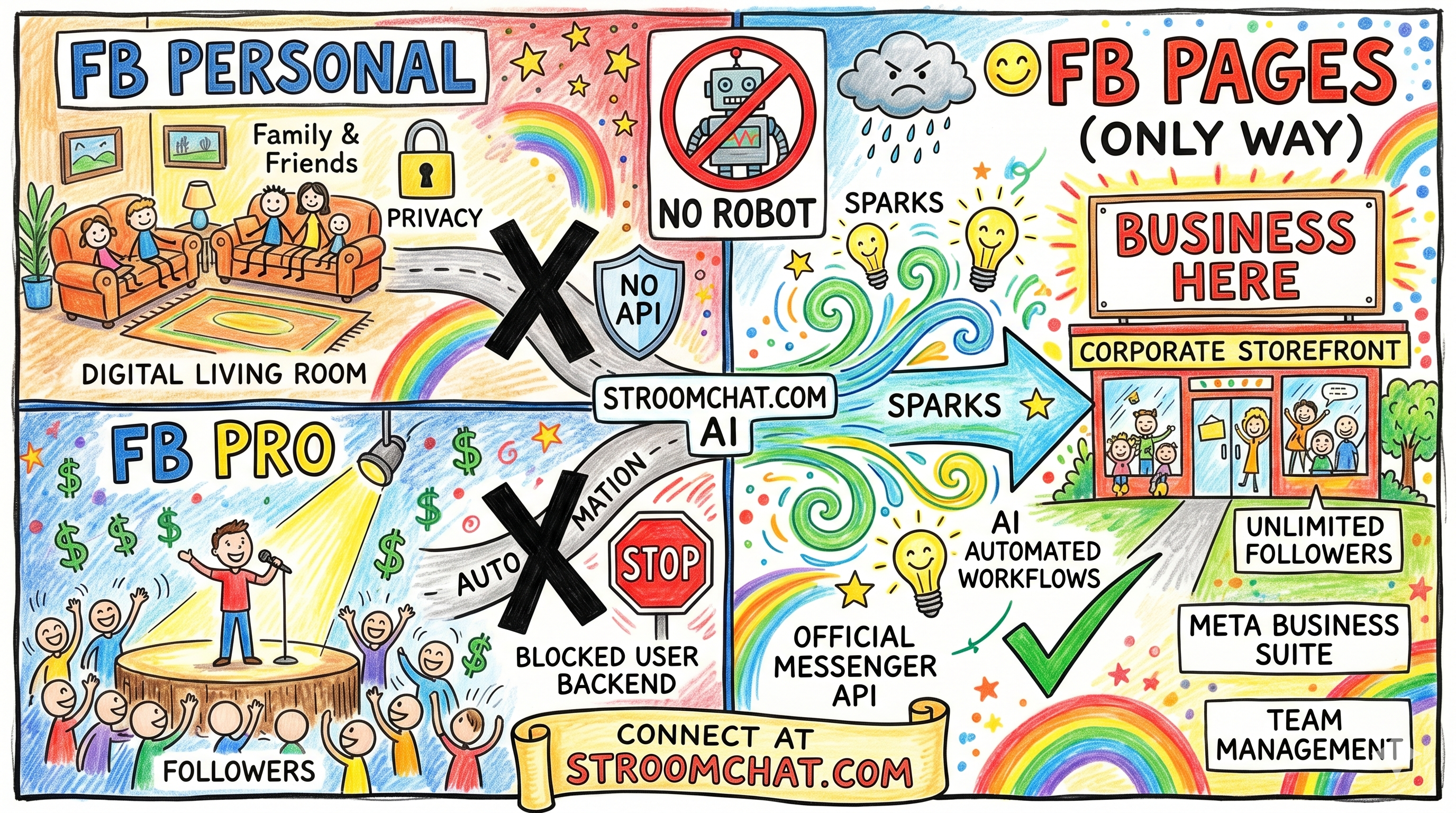
The modern digital economy runs on speed, scalability, and conversational AI. For creators, social media agencies, and B2B SaaS founders, the promise of automating customer engagement is highly enticing. Imagine having an AI-driven assistant that instantly answers product inquiries, qualifies leads, and closes sales in your Facebook direct messages 24/7/365. This is the exact value proposition of conversational commerce platforms like StroomChat.com.
Yet, as thousands of creators and brand managers attempt to plug their profiles into these automation engines, they run headfirst into a frustrating, confusing brick wall:
- "Why can't I connect my personal profile to an AI chatbot?"
- "I just upgraded to Facebook Professional Mode—why is my automation platform still telling me it's unsupported?"
The answer lies in a fundamental structural truth about Meta's platform architecture. Meta maintains a strict separation between personal privacy and business utility. It enforces this division through completely distinct application programming interfaces (APIs).
This guide will demystify the architectural reality behind Facebook Personal Profiles, Facebook Professional Mode, and Facebook Pages. By the end, you will understand exactly why Facebook Pages are the only viable, legally compliant, and technically supported vehicle for AI chatbot and workflow automation.
1. The Three Faces of Facebook: Definitions and Anatomy
To understand why automation works on one part of Meta's ecosystem but fails on another, we must first map the three primary account types that exist on Facebook today. Each serves a distinct philosophical purpose, operates under different audience limits, and is governed by a separate set of rules.
| Account Type | Metaphor | Key Traits |
|---|---|---|
| Facebook Personal | The Digital Living Room | 5k Friend Limit, Peer-to-Peer Focus |
| Facebook Pro | The Creator's Stage | Profile-Turned-Publisher, Unlimited Followers, but STILL a "User" Object Backend |
| Facebook Pages | The Corporate Storefront | Built for Business & API Access, Pure Enterprise Architecture |
Facebook Personal Profile (The Digital Living Room)
Your personal profile is designed for private, peer-to-peer interactions. It is the virtual space where you share life updates with family, connect with friends, and participate in local communities.
- Connection Limits: Hard-capped at 5,000 friends.
- Core Philosophy: Mutual consent. You send a friend request; they accept it.
- User Experience: Highly private. Only friends can view specific posts, and the account cannot be integrated with external business analytics or multi-admin team management tools.
Facebook Pro / Professional Mode (The Creator's Stage)
Introduced to combat the rise of creator-first platforms like TikTok, Facebook Professional Mode (or "FB Pro") allows users to turn their existing personal profiles into public creator profiles.
- Connection Limits: Unlimited followers, though the 5,000 friend limit still applies to the personal side of the profile.
- Core Philosophy: Broadcast-style monetization. It gives individual creators access to professional tools, such as the Professional Dashboard, the Reels Play Bonus program, Stars, and in-stream ads, without forcing them to build a separate business page from scratch.
- User Experience: To the public, it looks like a business page. It displays follower counts, category tags, and public posts. However, structurally, it remains a personal user profile.
Facebook Pages (The Official Enterprise Storefront)
Facebook Pages are dedicated public profiles designed specifically for businesses, brands, organizations, and public figures who require multi-user management and secure programmatic integrations.
- Connection Limits: Unlimited followers.
- Core Philosophy: Scalable business operations. Pages do not have "friends"—they have fans and customers. They are designed to exist within the Meta Business Suite ecosystem.
- User Experience: Pages support complex hierarchy structures (e.g., Admins, Editors, Advertisers), advanced Meta Pixel tracking, paid advertising campaigns, and—most importantly—deep API connectivity.
Direct Comparison Matrix
| Feature | Facebook Personal Profile | Facebook Professional Mode | Facebook Pages |
|---|---|---|---|
| Primary Audience Type | Friends & Family | Public Followers & Fans | Customers & Clients |
| Audience Limit | 5,000 Friends | Unlimited Followers | Unlimited Followers |
| Monetization Tools | None | Reels Play, Stars, Subscriptions | Meta Ads, Shop Integration |
| Team Management | Single User Only | Single User Only | Multi-Admin (Meta Business Suite) |
| Advertising Capability | Highly Limited Boosts | Personal Ad Account | Full Meta Ads Manager Access |
| Official Messaging API | No | No | Yes (Full Messenger API) |
| Workflow Automation | No | No | Yes (Compliant & Secure) |
2. The Technical Blueprint: Meta Graph API & Permissions
To understand why platforms like StroomChat.com can seamlessly automate a Facebook Page but cannot touch Facebook Pro, we must peel back the user interface and look directly at Meta's engine room: the Meta Graph API.
| Target | Object Type | Access Token | Messenger Platform | Webhook Event Sub | Third-Party Engines |
|---|---|---|---|---|---|
| Personal & Pro Accounts | User Object | User Access Token | BLOCKED | BLOCKED | BLOCKED |
| Facebook Pages | Page Object | Page Access Token | ALLOWED | ALLOWED | ALLOWED |
The Graph API is the primary avenue through which external applications read and write to Facebook's social graph. It is a highly structured, relational database where everything—a user, a page, a photo, a comment—is represented as an "node" (an object) with specific "edges" (connections between nodes) and "fields" (attributes of those nodes).
Inside the Facebook Pages API Ecosystem
When an automation platform like StroomChat interacts with a Facebook Page, it relies on a highly secure, officially supported architecture built on three pillars:
- The Page Access Token: Unlike a User Access Token (which expires quickly and represents a single person's session), a Page Access Token is generated when a user authorizes an app via Meta's secure OAuth flow. This token can be configured to be long-lived or permanent. It gives the authorized application permission to act on behalf of the Page itself, completely independent of whether the administrator is actively logged in.
- The Messenger API for Pages: This dedicated endpoint allows third-party servers to send and receive messages inside the Page's inbox. When a customer types a message to your business, the Messenger API forwards that payload securely to your automation server.
- Webhooks: A webhook is a real-time HTTP callback. When a user sends a message, comments on a post, or interacts with a custom button on a Facebook Page, Meta's servers instantly send an HTTP POST request containing JSON data to StroomChat. The AI processes this payload in milliseconds and returns an automated, contextual response.
The FB Pro and Personal Profile Barrier: Architectural Limitations
Many creators assume that turning on "Professional Mode" modifies their API access. This is a critical misconception.
In Meta's relational database architecture, Facebook Pro is still classified under the User schema, not the Page schema. Because of this fundamental design decision, the technical limitations are absolute:
- The Death of publish_actions: Years ago, Meta offered a permission called publish_actions, which allowed third-party apps to post content directly to a user's personal timeline. Following high-profile data-privacy scandals, Meta deprecated this permission. Today, no external application can programmatically post to a User timeline (Personal or Professional) without direct, manual user interaction.
- The "User Access Token" Security Wall: To access any user data, an app must use a User Access Token. Meta strictly audits these tokens. Under Meta's platform policies, a User Access Token cannot be used to listen to private messages or auto-respond on behalf of an individual user. Doing so triggers automatic system security flags, as Meta assumes the user's account has been compromised by a spam bot.
- The Complete Absence of a User Messaging API: The Messenger Platform API simply does not possess endpoints for the User object. There is literally no code, endpoint, or webhook event (such as messaging_postbacks or messages) designed by Meta's engineering team to monitor the inbox of a personal profile or a Facebook Pro account.
Critical Technical Truth: Even if you are a coder and attempt to build a custom application, you cannot write code to connect an AI chatbot to a Facebook Pro inbox using Meta's official APIs. The endpoints do not exist. Meta's backend database treats "Professional Mode" as a visual interface skin and monetization layer for a User, not an open integration portal for Enterprise Automation.
3. The Danger of "Workarounds" and Unofficial Automation
When creators discover they cannot use official APIs for FB Pro or Personal accounts, they often look for shortcuts. The internet is littered with sketchy software vendors promising "undetected" workarounds.
These workarounds generally rely on two highly fragile techniques:
- Headless Browser Automation: Using tools like Puppeteer, Selenium, or Playwright to launch a virtual browser window, log in with your credentials, and simulate a human clicking and typing to respond to messages.
- Browser Extensions & Scraping: Installing Chrome extensions that scrape your active Facebook tab to read incoming messages and inject text into the reply box.
If you are running a real business or trying to build a sustainable creator brand, relying on these methods is equivalent to building your house on active quicksand.
| Metric | Unofficial (Bots) | Official (API) |
|---|---|---|
| Account Security | Dangerous Risk | Fully Secure |
| Speed & Reliability | Extremely Fragile | Sub-second Latency |
| Terms of Service | Direct Violation | Fully Compliant |
| Data Encryption | None (Exposes PW) | End-to-End OAuth |
The Immediate Risks of Unofficial Automation
#### Permanent Account Bans (The "Death Penalty")
Meta employs some of the most sophisticated anti-bot and behavioral analysis algorithms in the world. They actively monitor mouse movements, typing cadences, IP address anomalies, and session finger-prints. When a headless browser automated bot logs into your personal profile or FB Pro account and begins blasting out replies, Meta's automated security systems flag it instantly.
Your entire account can be locked, disabled, or permanently banned with zero path to recovery. For a creator with hundreds of thousands of followers built over years, this is a catastrophic business risk.
#### Blatant Terms of Service Violations
Meta's Terms of Service explicitly prohibit the use of automated scraping, botting, or unauthorized access tools:
"You may not access or collect data from our Products using automated means (without our prior permission) or attempt to access data you do not have permission to access."
By using unauthorized automation, you violate a legal contract with Meta, granting them immediate cause to terminate your access across their entire family of apps, including Instagram and WhatsApp.
#### Security & Password Exposure
To run a headless browser bot, you must hand over your raw Facebook password to a third-party software provider. This exposes your entire digital identity—including linked credit cards, personal chat history, and managed business assets—to severe security vulnerabilities.
By contrast, compliant B2B SaaS platforms like StroomChat.com never ask for your password. They authenticate exclusively via secure, standardized Meta OAuth protocols, ensuring your credentials remain private and your operations completely safe.
4. The Strategic Action Plan for Creators and Brands
If you are currently running a Facebook Professional Mode profile and want to scale your business with conversational AI, you do not have to abandon your audience. Instead, you need to transition your operational structure to align with Meta's technical rules.
Here is your step-by-step blueprint to establish a future-proof, automation-ready infrastructure:
- Initialize Your Facebook Page
- Establish Meta Business Suite
- Redirect Traffic to Your Page
- Securely Connect StroomChat
Step 1: Initialize Your Facebook Page
If you don't already have one, set up an official Facebook Page that matches your brand or creator name. This process takes less than five minutes:
- Navigate to your Facebook menu and select Pages > Create New Page.
- Fill in your Page name, category, and bio.
Note: You can keep your FB Pro account for personal posting and organic creator reach while routing all official commercial, lead-generation, and customer support inquiries to your new Page.
Step 2: Establish Meta Business Suite
Link your new Facebook Page to a Meta Business Suite account. This is a centralized business hub that allows you to manage page roles, connect your Instagram Professional Account, and link your WhatsApp Business API number. By centralizing these assets, you build a unified, omni-channel ecosystem.
Step 3: Redirect Traffic from FB Pro to Your Page
You do not lose your existing FB Pro audience by creating a Page. Use the following tactical methods to funnel your traffic:
- **The Pinned Post:** Create a pinned post on your FB Pro profile stating: "For direct support, partnerships, and exclusive offers, send us a message on our official page [Link to Page]!"
- Call-to-Action Buttons: Update your FB Pro bio links to route users to your Page's Messenger link (m.me/YourPageName).
- Organic Cross-Promotion: Regularly use Reels and Stories on your Pro account to direct followers to the automation-driven experiences hosted on your Page.
Step 4: Connect to a Verified Platform (Like StroomChat.com)
Now that you have a Page, you can securely plug in professional-grade automation:
- Create an account on StroomChat.com.
- Click Connect Facebook Page.
- Log in with your Facebook account through the secure Meta pop-up window (OAuth).
- Select the specific Page you created and grant permissions (e.g., pages_messaging, pages_show_list).
- Design your AI chatbot flow, set up your instant replies, and watch your customer engagement scale automatically on a fully compliant architecture.
The Business Benefits of Pages & Official APIs
By transitioning to a Page-centric workflow, you instantly unlock features designed to scale enterprise operations:
- Multi-Agent Support: Allow multiple team members to manage your inbox simultaneously without sharing passwords.
- Unified Communications: Manage Instagram, Facebook, and WhatsApp inquiries in a single, unified inbox interface.
- Meta Ads Integration: Run highly lucrative "Click-to-Messenger" ad campaigns that trigger automated sales funnels, instantly capturing and qualifying cold traffic at a fraction of standard cost-per-acquisition metrics.
Conclusion: Building a Future-Proof Meta Automation Strategy
In the fast-moving landscape of conversational marketing, trying to hack Meta's ecosystem with unofficial workarounds is a losing battle. The technical architecture is absolute: Facebook Personal and Facebook Pro accounts do not support the APIs necessary for deep workflow automation.
To build an asset that grows safely over time, you must align with Meta's technical ecosystem. Transitioning to a Facebook Page is a strategic upgrade that unlocks secure, robust, and incredibly powerful automation tools.
By leveraging the official Meta Graph API through high-authority platforms like StroomChat.com, you protect your digital identity, remain completely compliant with Meta's terms, and establish a scalable conversational AI engine that works tirelessly for your business.
Are you ready to automate your lead generation, customer support, and sales on Facebook compliant with Meta's framework? Sign up for an account at StroomChat.com today and connect your Facebook Page in seconds.